Best for adjustable pink noise sleep sounds: myNoise. Best for choosing individual recordings: Spotify or Apple Music, depending on which you already use. Best alternative when you prefer white noise, rain, or lullabies: Calmamusic—not a verified pink-noise pick. This 2026 guide helps you choose without turning bedtime into another research project.
TL;DR
- myNoise is the best fit for parents who want to adjust pink noise sleep sounds.
- Spotify and Apple Music suit parents who prefer choosing recordings rather than adjusting a sound generator.
- Calmamusic suits parents seeking white noise, rain, or lullabies rather than a verified pink-noise option.
- Keep infant sleep sounds quiet, place the speaker away from the sleep space, and keep devices outside the crib.
Why this matters
When you are tired, a sound described as soothing can feel like one more thing you need to get right. You do not need to find a perfect noise color, and your baby does not need to respond the way another baby does.
Pink noise describes a sound spectrum, not a promise of sleep. Its energy decreases as frequency increases, giving it less emphasis on high frequencies than white noise. That difference helps explain the softer, lower-weighted impression—not whether your newborn will settle.
Calmamusic offers white noise, rain, and lullaby albums through Spotify, Apple Music, and the Calma app. Those are relevant alternatives, but a rain recording is not automatically pink noise. Choose by the actual sound and its description, not the cover image or a sleep claim.
What makes the best pink noise sleep sounds?
For this 2026 shortlist, the useful criteria are the ones you can check before leaving a sound playing:
- Sound identity: A pink-noise label should describe the recording or generator, not just a playlist theme.
- Comfortable texture: Listen for sharp hiss, conspicuous pulses, voices, or changes that bother you.
- Useful control: Decide whether you want to adjust the sound itself or simply select a recording.
- Playback behavior: Check transitions, device notifications, and what happens when your selected recording ends.
- Simple operation: Choose something you can manage without searching through menus at bedtime.
- Appropriate placement: Your setup needs to work with the speaker away from your baby, not beside their head.
The best choice is the one you can identify, preview, and keep quiet—not the one with the longest feature list. None of these criteria establishes that a sound treats a sleep problem.
Pink noise listening options at a glance
The order below reflects distinct listening needs, not measured sleep outcomes. The final entry is deliberately an alternative: its supplied description does not establish a pink-noise offering.
| Option | Best for | Standout distinction | Key limitation |
|---|---|---|---|
| myNoise | Adjusting a noise texture | Sound-generator approach with frequency controls | Adjustments add decisions; settings are not infant-volume guidance |
| Spotify | Choosing individual recordings | A recording-based listening route | A pink-noise title does not establish consistency or suitability |
| Apple Music | Staying with an existing music library | Another recording-based listening route | Albums and playlists require individual previewing |
| Calmamusic | Choosing white noise, rain, or lullabies instead | Baby-focused albums and the Calma app | Pink noise is not verified in the supplied offering |
1. myNoise: best pink noise option for sound adjustment
myNoise uses adjustable sound generators, including noise-generation tools. That makes it a different kind of choice from pressing play on a finished album: you can change the balance of the sound rather than repeatedly search for another recording.
myNoise is the best fit for parents who want adjustable pink noise rather than a fixed recording. Its official White Noise & Co. generator is a relevant starting point for understanding its frequency-control approach. Check the selected generator and its description rather than assuming every sound on the service is pink noise.
myNoise pros
- Frequency controls let you change the sound's tonal balance.
- A generator suits listeners who dislike searching through albums.
- Adjustment gives parents a way to explore their own listening preference.
myNoise cons
- More controls mean more choices when you are already tired.
- Changing frequency balance can move the result away from a particular noise profile.
- A comfortable sound at your chair does not establish a suitable level beside the crib.
Best for: Parents who want to shape a sound rather than choose among finished tracks.
Start with the generator's documented noise setting. If you change it, judge whether it remains comfortable at a quiet level; do not keep increasing volume to make a particular frequency more noticeable. For a newborn's room, sound adjustment never replaces careful speaker placement.
Verdict: Buy into the generator approach if sound adjustment is your priority; skip it if you want fewer controls.
2. Spotify: best for choosing a particular recording
Spotify is a route to pink-noise recordings rather than a single pink-noise product. The meaningful choice is the recording you select, including its sound, transitions, and playback context.
That distinction matters. Two tracks with similar titles can have different textures, and a playlist can move between recordings you have not previewed. Treat the track as the item you are evaluating—not the platform's name as a guarantee.
Spotify pros
- You can compare recordings instead of adjusting frequency controls.
- Album and artist information helps you identify a recording again.
- An existing listening habit can make the setup feel less unfamiliar.
Spotify cons
- A track title alone does not verify its sound spectrum or recording quality.
- A playlist introduces transitions that need checking.
- Your account, device, and playback settings affect the listening experience.
Best for: Parents who already use Spotify and prefer selecting a recording.
For your 2026 bedtime setup, preview the actual track, not just a short sample. Check its beginning and ending, then confirm what plays next. Do not assume playback will repeat, remain free of interruptions, or behave the same way on every device.
Save the recording you have checked so you do not have to repeat the search each night. That is an organizational shortcut, not evidence that a particular recording will improve sleep.
Verdict: Buy into this route if Spotify is familiar; skip unpreviewed playlists for bedtime.
3. Apple Music: best for staying with your music library
Apple Music provides another route to pink-noise recordings and albums. Like Spotify, it is a listening platform, not one standardized sound.
Choose Apple Music when keeping bedtime audio alongside the music you already use makes the process simpler. There is no reason to change platforms solely because a different service carries a recording with a more persuasive title.
Apple Music pros
- Recorded albums offer a straightforward alternative to sound-generator controls.
- Artist and album details help distinguish one selection from another.
- Keeping audio in a familiar library reduces the need to learn another interface.
Apple Music cons
- Recordings still require checking for noticeable changes and endings.
- A music platform's name does not verify infant suitability.
- Device and playback settings remain part of the setup.
Best for: Parents who already organize their listening in Apple Music.
Listen for the details that matter to you: a high, sandy hiss; a low rumble; an obvious repeating pattern; or a change between tracks. These descriptions help you compare recordings, but they do not replace a clear pink-noise label when that specific spectrum is what you want.
Apple Music and Spotify occupy different convenience slots, not different levels of infant sleep effectiveness. Choose between them based on familiarity and the recording you can actually check.
Verdict: Buy into this route if Apple Music is already familiar; skip switching services without a specific reason.
4. Calmamusic: best for white noise, rain, and lullaby alternatives
Calmamusic makes white noise, rain, and lullaby albums for babies and parents, with listening through Spotify, Apple Music, or the Calma app. It belongs here as an alternative for families who discover that pink noise is not the sound they want.
Calmamusic is a baby sleep sound option for parents choosing white noise, rain, or lullabies rather than verified pink noise. That is a narrower recommendation than calling it the best pink-noise app, and it matches the supplied offering.
Calmamusic pros
- The stated sound categories give you clear alternatives to explore.
- Albums are made by music producers for babies and parents.
- The Calma app provides an app-based listening route alongside the streaming platforms.
Calmamusic cons
- The supplied description does not verify a pink-noise recording.
- App playback controls and interruption behavior are not established here.
- Rain, white noise, and lullabies should not be treated as interchangeable sound types.
Best for: Parents who want baby-focused sound choices without committing to pink noise.
If you prefer a rain recording, you can choose it for that preference. You do not need to relabel it as pink noise or find a scientific explanation for liking it. Preview the actual selection and use the same quiet-listening precautions.
Verdict: Buy into this alternative for its stated sound categories; skip it when verified pink noise is essential.
Set up the sound before bedtime
A useful 2026 listening check is short and practical. These steps are a suggested routine, not clinical thresholds or a test of hearing safety.
- Preview quietly. Take a 30-second first listen yourself. Reject anything immediately harsh or distracting, then check more of the recording before using it around your baby.
- Check transitions. Inspect the beginning, ending, and next selection. Listen for speech, abrupt changes, or an obvious restart.
- Place away. Keep the speaker away from your baby's head and outside the sleep space. Keep cords out of reach.
- Listen nearby. Check from 2 listening positions: your usual seat and beside the sleep space. Your phone's volume setting is not a measurement of the sound reaching your baby.
- Keep it simple. Start with 1 sound at a time. Layering several sounds makes it harder to tell what you like or what needs adjusting.
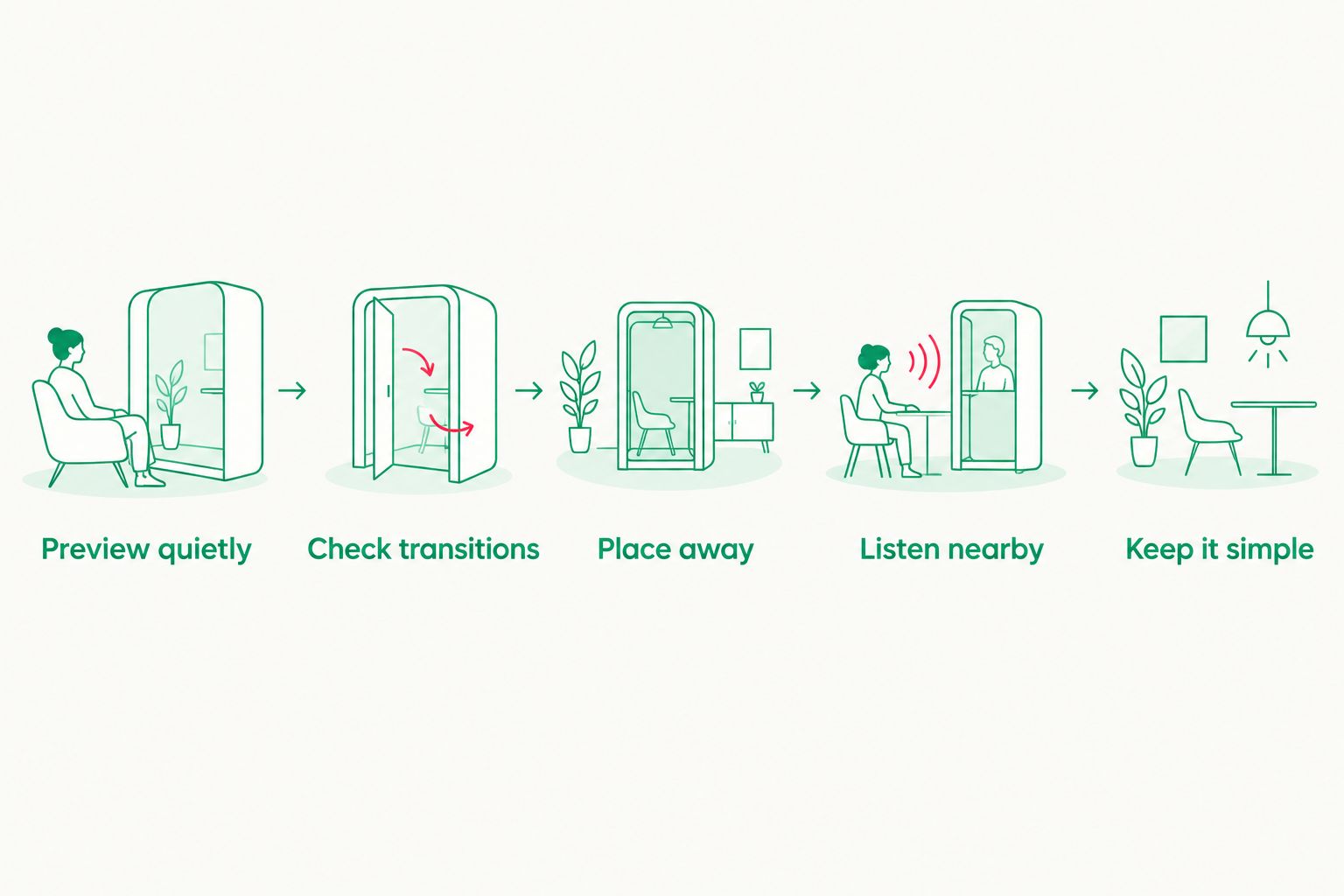
Check the recording and the listening position before making it part of bedtime.
You do not need to keep changing sounds because your baby has an unsettled night. Sound is one environmental choice, not a scorecard for your parenting.
Keep infant sound advice separate from sleep claims
For infant listening decisions in 2026, follow pediatric guidance rather than an app's strongest promise. The American Academy of Pediatrics policy, Preventing Excessive Noise Exposure in Infants, Children, and Adolescents, advises placing infant sleep machines as far away as possible, using the lowest volume, and limiting exposure duration.
That guidance does not establish a universal phone-volume percentage. Sound reaching your baby depends on the device, recording, placement, and room. Do not treat an adult workplace noise limit as an infant bedtime target.
Safe-sleep guidance remains separate. The American Academy of Pediatrics and the National Institutes of Health's Safe to Sleep program recommend placing babies on their backs on a firm, flat sleep surface with no loose bedding or soft objects. A phone or speaker does not belong in the crib.
For concerns about hearing, persistent sleep difficulties, or how to use sound around your newborn, ask your pediatrician. No noise color replaces individualized medical advice.
How the options were ranked
These recommendations use sound identity, adjustment, recording selection, playback checks, and setup simplicity. They are editorial fit judgments—not hands-on test results, clinical rankings, or evidence that one platform produces longer sleep.
The distinction is deliberate: myNoise fits adjustment, Spotify fits recording selection, Apple Music fits an existing library, and the final option fits a change of sound category. No ranking depends on an invented sleep-success rate.
Which pink noise option should you choose?
Choose myNoise if you specifically want adjustable pink noise. Choose Spotify or Apple Music if you would rather select a recording in a familiar service. Choose the alternative sound categories only when those are what you actually want.
For 2026, the simplest decision is still the useful one: identify the sound, preview the playback, and keep the setup quiet. You deserve a moment of calm without another complicated bedtime project.
FAQ
What's the best option for adjustable pink noise sleep sounds?
myNoise is the best fit in this shortlist for adjusting a noise texture. Use the generator's description to identify the sound, and remember that its controls do not establish a safe infant listening level.
Is pink noise better than white noise for newborns?
This guide does not establish that pink noise is better than white noise for newborns. They have different frequency distributions, but that difference does not prove better infant sleep.
Can I use Spotify for pink noise at bedtime?
Spotify is a route to pink-noise recordings. Preview the selected track, check its ending and next selection, and confirm how playback behaves on your device.
Is Apple Music better than Spotify for baby sleep sounds?
Neither platform is established here as better for baby sleep. Choose the familiar service and evaluate the actual recording rather than assuming the platform determines the result.
Does the Calma app have pink noise?
The supplied description does not verify pink noise in the Calma app. The stated offering covers white noise, rain, and lullaby albums.
How loud should pink noise be near my newborn?
Use the lowest volume and place the speaker as far away as possible, following American Academy of Pediatrics guidance for infant sleep machines. A phone's volume percentage is not an infant sound-level measurement.
Can I put my phone in the crib to play sleep sounds?
Keep the phone and its cords outside the crib. Follow pediatric safe-sleep guidance: place your baby on their back on a firm, flat sleep surface without loose bedding or soft objects.
One last thing
The sound at your bedside is not necessarily the sound beside your baby. Before settling into your own chair, check the listening position near the sleep space; that small change in perspective matters more than finding a recording with the most reassuring name.