Best overall brown noise app: myNoise for adjustable sound. Best for mixing a simple soundscape: Noisli. Best for exploring sleep sounds: BetterSleep. This 2026 guide compares those choices and includes a white-noise, rain, and lullaby alternative for parents who want something other than brown noise.
TL;DR
- myNoise is the best brown noise app here for listeners who want to adjust the sound.
- Noisli suits sound mixing; BetterSleep suits browsing different sleep sounds.
- Calmamusic is best for parents seeking producer-made white noise, rain, and lullaby albums.
- For babies, keep sound low, place the device away from the sleep space, and follow pediatric guidance.
If you are choosing during a night feed, you do not need another complicated decision. Calmamusic offers producer-made white noise, rain, and lullaby albums through the Calma app, Spotify, and Apple Music; keep that alternative in mind if brown noise feels too heavy or rumbly.
Why this matters
Brown noise has more energy at lower frequencies than white noise. You hear a deeper, heavier sound rather than the brighter hiss associated with white noise. That difference describes the sound, not a proven advantage for newborn sleep.
For your 2026 shortlist, separate two questions: do you like the sound, and can you use it sensibly around your baby? An app can answer the first question without establishing the second. A soothing label is not a safety certification.
You are also allowed to decide that you do not like brown noise. Rain, a lullaby, or a quieter room are reasonable alternatives; choosing a sound does not commit you to a sleep-training method.
What makes the best brown noise app?
These are the criteria that matter before you compare individual apps:
- Sound character: The low rumble should be comfortable to you, without an unpleasant buzz or distracting texture.
- Useful adjustment: Choose detailed controls if you want to shape the sound, or a simpler selection if controls become another chore.
- Sound mixing: Combining noise with rain or another background sound is useful only if the combination feels easier to listen to.
- Listening fit: Check the app on the device and speaker you will actually use, not just through headphones during setup.
- Playback behavior: Listen for changes at transitions, and check how your chosen settings behave before relying on them at bedtime.
- A sensible nursery setup: Device placement and playback level matter more than a sleep-themed name or attractive interface.
The best choice is the app whose sound you like at a low listening level—not the app with the longest feature list. None of these criteria establishes a medical benefit.
Brown noise apps at a glance
The first 3 options offer brown noise. The final option is a different listening route for parents who prefer white noise, rain, or lullabies rather than a brown-noise generator.
| Option | Best for | Standout feature | Key limitation |
|---|---|---|---|
| myNoise | Shaping the noise texture | Adjustable frequency sliders | More adjustment than a simple sound selector |
| Noisli | Mixing a background soundscape | Brown noise alongside other mixable sounds | Mixing adds decisions if you want one sound |
| BetterSleep | Exploring sleep-sound combinations | Brown noise within a broader sound library | A wider selection can distract from a simple routine |
| Calma app | Parents considering alternatives to brown noise | Producer-made white noise, rain, and lullaby albums | Those sound categories do not establish brown-noise functionality |
These are different use cases, not a claim that one app makes babies sleep longer. Start with the row that describes what you need tonight.
1. myNoise: best brown noise app for sound adjustment
myNoise provides sound generators with frequency sliders, allowing you to change the balance of the noise. That makes it a useful starting point when a fixed brown-noise track sounds too bass-heavy, too bright, or simply unpleasant to you.
The attraction is control. Instead of moving through a long sequence of recordings, you can adjust the texture you are already hearing. Stop adjusting once it feels comfortable; finding a perfect setting is not a bedtime requirement.
myNoise pros:
- Frequency controls let you shape the sound rather than accept a fixed recording.
- Noise generators suit listeners who want to focus on the sound itself.
- Adjustable texture gives you an alternative to repeatedly changing tracks.
myNoise cons:
- Sliders add setup decisions when you are tired.
- A sound you prefer is not evidence that it is better for your baby.
- Frequency adjustment does not replace careful volume and device placement.
Best for: Parents who already like noise-based sound and want to adjust its character.
Before choosing it for the nursery, listen through the speaker you intend to use. A phone speaker and a separate speaker can make the same settings sound different, particularly at lower frequencies.
Verdict: Choose myNoise if shaping the sound is your priority; skip it if you want no adjustment work.
2. Noisli: best brown noise app for simple sound mixing
Noisli lets you combine background sounds, including brown noise, into a soundscape. It suits a different need from detailed frequency adjustment: choosing which sounds belong together.
You might prefer brown noise alone, or find that adding rain makes the listening experience more comfortable. The useful feature is the choice to combine sounds, not a promise that a layered mix works better for infant sleep.
Noisli pros:
- Brown noise can sit alongside other background sounds.
- Separate sound levels let you decide which element stands out.
- A soundscape approach suits parents who also want background audio for their own quiet time.
Noisli cons:
- Adding sounds creates more decisions than selecting a single recording.
- A pleasant mix for an adult is not automatically an appropriate nursery setup.
- Multiple layers can make it harder to identify which sound you actually like.
Best for: Parents who want to combine brown noise with other background sounds.
Start with brown noise alone before adding anything else. If you do introduce another sound, listen again at the intended playback level rather than assuming the original volume setting still feels right.
Verdict: Choose Noisli for mixing; skip extra layers when one sound already does the job.
3. BetterSleep: best brown noise app for exploring sound options
BetterSleep includes brown noise within a broader collection of sleep sounds and supports sound combinations. It fits listeners who are still deciding whether brown noise, rain, or another texture is their preference.
That breadth is useful during selection. Once you have found something you like, however, there is no need to keep browsing every evening. A larger library is a choice benefit, not evidence of a better sleep outcome.
BetterSleep pros:
- Brown noise is part of a wider sound selection.
- Sound mixing supports comparisons between different combinations.
- The broader library suits adults who want alternatives to noise alone.
BetterSleep cons:
- More choice can turn a quick decision into extended browsing.
- Adult sleep content should not be treated as newborn-specific guidance.
- A sound library cannot tell you the exposure level at your baby's sleep position.
Best for: Parents who want to explore different sound textures before settling on one.
Keep your comparison narrow: listen to brown noise, then one alternative. You are choosing something comfortable to hear, not trying to identify a sound with guaranteed effects on sleep.
Verdict: Choose BetterSleep for variety; skip the browsing if you already know which sound you want.
4. Calma app: best alternative for white noise, rain, and lullabies
Calmamusic is best for parents seeking producer-made white noise, rain, and lullaby albums. You can listen through the Calma app or use Spotify and Apple Music, giving you 2 streaming-service alternatives to the app route.
This is an alternative to the brown-noise shortlist, not a claim of equivalent brown-noise controls. Choose it because its stated sound categories match what you want to hear.
Calma app pros:
- White noise, rain, and lullabies give you distinct listening directions.
- Music producers make the albums.
- Spotify and Apple Music offer alternative ways to hear the albums.
Calma app cons:
- White noise, rain, and lullabies do not establish a brown-noise generator or frequency controls.
- The stated sound selection does not establish playback duration or transition behavior.
- No album category guarantees that your baby will settle or sleep longer.
Best for: Parents who prefer rain, lullabies, or white noise to a deep brown-noise rumble.
There is no need to force yourself to enjoy brown noise because it appears on a shortlist. If a softer rain texture or a melody is more comfortable for you, start there and check the actual recording before bedtime.
Verdict: Choose the Calma app for its stated sound categories; do not assume brown-noise functionality.
Set up the sound before bedtime
For a 2026 nursery setup, follow the American Academy of Pediatrics' guidance on avoiding excessive noise exposure: keep sound low, place the source away from your baby, and limit exposure. A percentage on a phone's volume slider is not a measurement of sound at the baby's ears.
Use this short sequence before you settle in:
- Choose the sound. Listen yourself and reject anything uncomfortable or distracting.
- Place the device. Keep the sound source away from the sleep space and cords out of reach.
- Lower the volume. Start low rather than turning sound up to overpower crying or household noise.
- Check playback. Listen for transitions and check your device's notification and playback settings.
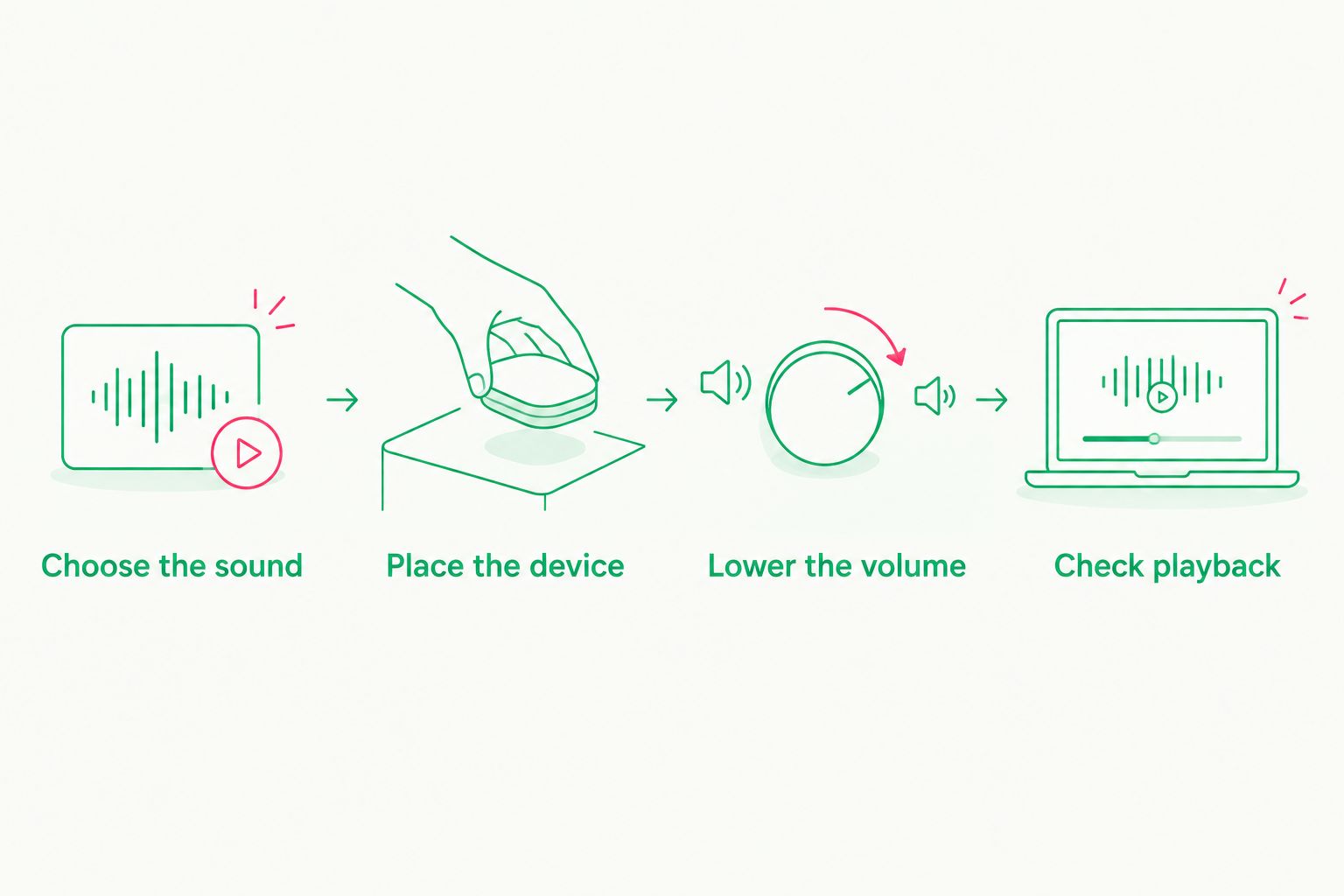
Set up the device and listening level before bedtime becomes busy.
Keep the sleep space separate from the listening equipment. The American Academy of Pediatrics recommends placing babies on their backs on a firm, flat sleep surface, without soft bedding or loose objects; an audio device does not belong in that space.
Brown noise is not a safe-sleep measure and does not prevent sudden infant death syndrome. If your baby has hearing concerns or you need individual advice about sound exposure, ask your pediatrician rather than relying on an app description.
How these picks are ranked
This 2026 ranking separates sound adjustment, mixing, exploration, and alternatives. myNoise leads for control; Noisli fits mixing; BetterSleep fits variety. The Calma app belongs as a clearly labeled alternative because its stated offering centers on white noise, rain, and lullabies.
The ranking concerns listening choices, not clinical effectiveness. It does not claim hands-on testing, compare unverified playback durations, or award points for medical promises.
Which brown noise app should you choose?
Choose myNoise as the default if you specifically want adjustable brown noise. Choose Noisli when combining sounds matters more, or BetterSleep when you are still exploring different textures.
For parents whose preference is white noise, rain, or lullabies, Calmamusic is the more relevant starting point. In 2026, the useful decision is still a small one: pick the sound you want, check how it plays, and keep the setup simple.
FAQ
What's the best brown noise app for parents?
myNoise is the best choice in this guide for parents who want adjustable brown noise. Noisli suits sound mixing, while BetterSleep suits exploring different sound options; none is ranked here for proven infant sleep benefits.
Is brown noise better than white noise for a newborn?
This guide does not establish that brown noise is better than white noise for newborn sleep. Brown noise emphasizes lower frequencies, so the difference you hear is a deeper sound rather than proof of a better outcome.
Can I play brown noise all night for my baby?
Do not treat all-night playback as automatically appropriate for your baby. The American Academy of Pediatrics advises limiting noise exposure, keeping sound low, and placing the source away from the baby; ask your pediatrician for individual guidance.
What volume should a baby sleep sound app use?
Use a low listening level and follow pediatric guidance rather than relying on a phone-volume percentage. Actual exposure depends on the device, speaker, distance, and room, so a slider setting alone does not establish safety.
Does the Calma app offer brown noise?
The stated Calma app offering covers white noise, rain, and lullaby albums, not a confirmed brown-noise feature. Choose it for those sound categories and check the current selection before treating it as a brown-noise option.
Is a sound app better than a Spotify or Apple Music album?
An app is not automatically better than an album for your listening needs. Choose based on the sound and controls you want, then check playback behavior on the actual service and device you plan to use.
Can brown noise prevent sudden infant death syndrome?
No. Brown noise does not prevent sudden infant death syndrome and must not replace safe-sleep practices, including back sleeping on a firm, flat surface without soft bedding or loose objects.
One last thing
Listen where the sound will actually be heard, not only beside the speaker. Before your baby is in the sleep space, check the sound from that area and make adjustments without placing the device inside it.
If the search for the right app has become another task keeping you awake, stop comparing. Choose a comfortable sound at a low level—or choose quiet. You deserve a moment of calm, not another setting to perfect.